
Cat Battles Abilities: Ability List and Q Control
See all eight Cat Battles ability names, learn the official Q control, and use a practical worksheet to record what happens in a bout.
FAQ
How many abilities does the official page list?
What are the eight listed ability names?
Which key uses an ability?
Do we know what each ability does?
Are ability costs and cooldowns published?
Which Cat Battles abilities are officially named?
The official Cat Battles Roblox description lists eight names: Dash, Pounce, Hiss, Anchor, Stomp, Catnip, Fluff Up, and Hairball. It also says, “Use your ability with Q!” This first-party list was checked on October 12, 2026.
| Listed name | What the official source confirms |
|---|---|
| Dash | The name appears in the eight-ability list. |
| Pounce | The name appears in the eight-ability list. |
| Hiss | The name appears in the eight-ability list. |
| Anchor | The name appears in the eight-ability list. |
| Stomp | The name appears in the eight-ability list. |
| Catnip | The name appears in the eight-ability list. |
| Fluff Up | The name appears in the eight-ability list. |
| Hairball | The name appears in the eight-ability list. |
How can you learn an ability in a bout?
Use Q as the documented ability input, then record the observation in a small table. Keep the game’s labels and visible values in your notes:
| Field | What to record |
|---|---|
| Name | Which of the eight names was selected or shown? |
| Trigger | What did the interface require before Q was available? |
| Visible result | What changed on screen immediately after use? |
| Target and range | Who or what visibly changed, and from what position? |
| Cost | Did the game show a resource change? Record the displayed value only. |
| Cooldown | Did the game show a timer or lockout? Record its displayed wording. |
| Confidence | One observation, repeated observation, or still unknown? |
Repeat the same starting position before comparing a different target, mode, or distance. That gives you a cleaner way to tell which visible change belongs to the ability you tested.

Several cats lift an opponent in the elevator arena.
How can the gameplay stills anchor your notes?
Use the ring-edge still as a visual anchor for a position and the visible HUD while you test an input. Describe what is visible, such as “orange cat lifts near the boundary,” and attach the date of your observation.

An orange cat lifts an opponent at the ring edge during a sudden-death bout.
The elevator countdown still is useful as a neutral baseline for your notes. If an ability is selected before a bout, record what the interface actually displays rather than assuming a named ability is active.
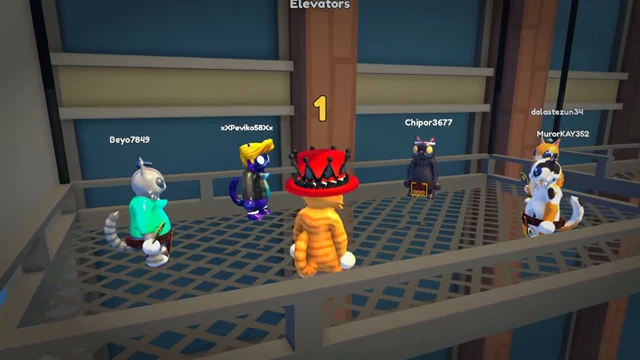
Cats wait on the metal elevator platform during the pre-bout countdown.
Media credit: Cute Malt Games, official Roblox preview asset 83504175164665,
via the official Cat Battles page.
How should you choose an ability today?
Start with the name you can identify, use Q when the game makes it available, and compare repeated observations in the same kind of situation. The controls guide covers the rest of the PC inputs, while the beginner guide gives a first-bout routine.
Use the game modes guide to label whether an observation came from Classic, 2 Teams, or 4 Teams. If you are tracking cosmetic progression after a bout, the furs and crates guide covers the coin and crate loop.
Related Articles
guides
Cat Battles Roblox Beginner Guide: How to Play a Bout
Start Cat Battles Roblox with the five PC inputs, the ring objective and a first-bout practice plan. Learn where coins, crates and listed codes fit in.
guides
Cat Battles Roblox Controls: PC Keyboard & Mouse Guide
Learn the five official Cat Battles Roblox PC controls: Punch, Grab, Kick, Lift and Q. Use the binding table and practice steps before your next bout.
guides
Cat Battles Furs and Crates: Coins and Cosmetics Guide
Learn which Cat Battles furs are named officially and how to track coins, crate contents, and collection progress.
Was this helpful?
Thanks for the feedback!